Emby port
Emby Port 8096: Every Port and How to Reach Emby Remotely
Emby Server uses TCP port 8096 for HTTP and TCP 8920 for HTTPS, plus UDP 7359 for app discovery and UDP 1900 for DLNA on your LAN. For remote access, forward one port, 8920 with HTTPS, and turn on Allow remote connections. Emby Connect does not relay video, so behind CGNAT use a VPN with port forwarding.
Some links on this page are affiliate links. If you buy through them, we may earn a commission at no extra cost to you.
- HTTP port
- 8096 TCP
- HTTPS port
- 8920 TCP, needs a certificate
- Server discovery
- 7359 UDP, LAN only
- DLNA
- 1900 UDP, LAN only
- Relay service
- None; Emby Connect is discovery only
Last updated:
Emby Server ports
Emby's setup guide asks you to allow TCP 8096 and 8920 and UDP 7359 in the server's firewall. The Windows installer usually adds those rules for you; on Linux and NAS systems you may need to add them yourself.
| Port | Protocol | Used for | Configurable | Forward on the router? |
|---|---|---|---|---|
| 8096 | TCP | Web app, Emby apps and API over HTTP | Yes | Only if you have no HTTPS; prefer 8920 or 443 |
| 8920 | TCP | HTTPS, once a certificate is configured | Yes | Yes, if Emby serves HTTPS itself |
| 7359 | UDP | Server discovery by apps on the LAN | No | No |
| 1900 | UDP | DLNA and UPnP discovery (SSDP) | No | No |
Emby and Jellyfin both use 8096
Jellyfin started as a fork of Emby, so the two share the same defaults: 8096 for HTTP, 8920 for HTTPS and 7359 for discovery. If you run both on one machine, or try Jellyfin while Emby is installed, the second server cannot bind to 8096. Move one of them to another port, for example Emby on 8097. See the Jellyfin port guide for its settings.
How to change the Emby port
- 1
Open Network settings
In the Emby Server dashboard, go to Settings > Network. You will see separate local and public port numbers for HTTP and HTTPS.
- 2
Change the local port
The local HTTP and HTTPS port numbers are what Emby listens on. Pick a port nothing else on the host uses; avoid 8080, which many self-hosted apps already claim.
- 3
Set the public port if it differs
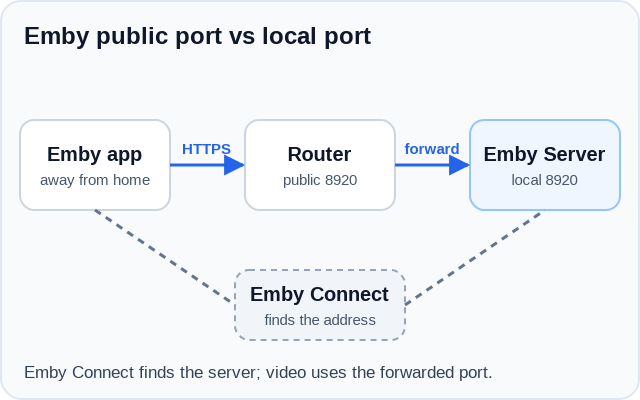
The public port numbers are only what Emby tells remote apps to use. Changing them does not open anything on your router: you still have to forward that public port to the local one.
- 4
Save and restart
Restart Emby Server, then update the address in your apps, your reverse proxy and your router's forwarding rule.
Docker
The official image publishes 8096 and 8920. To run Emby on another host port, change only the left side of each mapping. Discovery on 7359 and DLNA on 1900 need host networking, because broadcasts do not reach a bridged container.
# docker-compose.yml
services:
  emby:
    image: emby/embyserver
    ports:
      - 8096:8096   # host:container, e.g. 8097:8096 next to Jellyfin
      - 8920:8920
    environment:
      - UID=1000
      - GID=1000
    volumes:
      - ./config:/config
      - /path/to/media:/mnt/media
How to set up Emby remote access
- 1
Allow remote connections
In Settings > Network, tick Allow remote connections to this Emby Server. Also check that each user who watches from outside is allowed remote access in their user settings.
- 2
Try automatic port mapping, or forward manually
Enable automatic port mapping only if your router supports UPnP and you are happy to leave it on. Otherwise forward the port yourself: external TCP 8920 to the server's LAN IP on 8920 (HTTPS), or 8096 if you have no certificate yet.
- 3
Match the public port
If you forward a different external port, such as 42890 to 8096, enter 42890 as the public port in Emby so the remote address it hands to apps is correct.
- 4
Link Emby Connect
Link your server to an Emby Connect account. Apps can then find your server by signing in, so viewers do not need to type your IP address.
- 5
Test from outside
Run the port forwarding test on the public port, then open the remote address on mobile data.
Emby remote access not working?
Run the CGNAT check before spending time on router settings. On Starlink, 5G home internet and many fiber ISPs, CGNAT is the reason nothing works.
| Symptom | Likely cause | Fix |
|---|---|---|
| Works at home, not on mobile data | No forwarding rule, or Allow remote connections is off | Forward the port manually and tick Allow remote connections |
| Port test shows closed | Host firewall blocks the port, or the rule points at the wrong IP | Allow TCP 8096/8920 in the firewall; reserve the server's LAN IP |
| Remote address in Emby shows the wrong port | Public port does not match the router rule | Set the public port to the external port you forwarded |
| Router WAN IP is 100.64.x.x to 100.127.x.x | CGNAT: your ISP shares a public IP | Router port forwarding cannot work; see the CGNAT options below |
| Emby Connect signs in but playback fails remotely | Connect found the server, but the server is not reachable | Emby Connect is not a relay; fix port forwarding or use a tunnel |
Emby remote access behind CGNAT
Unlike Plex, Emby has no relay that carries your streams when the server cannot be reached. Behind CGNAT you have to provide a reachable address yourself. Emby's own documentation lists asking the ISP for a public IP, a VPN, or a tunnel as the ways out.
| Option | Cost | Works on TVs and family devices | Notes |
|---|---|---|---|
| Public IPv4 from your ISP | Varies; may need a business plan | Yes | Not offered by Starlink residential and most 5G plans |
| Tailscale or ZeroTier | Free | Only devices that can run the app | Rokus, most smart TVs and consoles cannot |
| Cloudflare Tunnel | Free | Yes, in a browser | Cloudflare's terms restrict serving video through it |
| Reverse proxy on a VPS | VPS rental | Yes | You maintain a server and a tunnel |
| VPN with port forwarding | Subscription, 31-day money-back guarantee | Yes | Public IP and port on the VPN server; no ISP changes |
Fixed or random port?
Proton VPN and PIA forward a random port that can change when you reconnect. Emby lets you change its local port, so that can work, but you have to update Emby's port and every app's address each time.
PureVPN's Port Forwarding add-on lets you choose the ports, so you can open 8920 (or 443 and 80 for a reverse proxy with automatic HTTPS) once and keep it. Add a dedicated IP so the address in Emby Connect and your DNS record stays the same. See port forwarding behind CGNAT for a full comparison.
Share Emby behind CGNAT
PureVPN + Port Forwarding
- Pick the ports to open, such as 8920 or 443, up to 15 at a time.
- Viewers install nothing: Emby apps, TVs and browsers connect directly.
- Dedicated IP option for a stable remote address.
- 31-day money-back guarantee.
Is it safe to open the Emby port?
- Avoid forwarding 8096: it is plain HTTP, so passwords travel unencrypted. Use 8920 with a valid certificate, or 443 on a reverse proxy.
- Set Secure connection mode so remote clients must use HTTPS.
- Give every user a password, and turn off remote access for accounts that only watch at home.
- Never forward 7359 or 1900, and check what your public IP exposes with the port scanner.
Emby port FAQ
What is the default Emby port?
TCP 8096 for HTTP and TCP 8920 for HTTPS. HTTPS on 8920 only works after you configure a certificate.
What ports does Emby need?
8096/TCP for local access, 8920/TCP for HTTPS, 7359/UDP for apps to discover the server on your LAN, and 1900/UDP for DLNA. Only 8920 (or 8096) is ever forwarded for remote access.
Should I forward 8096 or 8920?
8920 with HTTPS, or 443 to a reverse proxy. Forwarding 8096 works, but it sends logins over plain HTTP.
What is the public port in Emby?
It is the port Emby tells remote apps to connect to. It does not open anything; your router must forward that public port to Emby's local port.
Does Emby Connect work without port forwarding?
Emby Connect helps apps find your server, and streams go straight to your server. Make the server reachable with a port forward, or behind CGNAT with a VPN that supports port forwarding, and Emby Connect does the rest.
Can Emby and Jellyfin run on the same machine?
Yes, but both default to 8096 and 8920, so move one of them to different ports first.
How do I connect an Emby app to my server manually?
In the app, choose to add a server manually and enter its address and port, such as 192.168.1.20 and 8096 at home, or your public address and 8920 when you are away.
Is Emby free?
Emby Server is free to install and use. Emby Premiere is an optional subscription that unlocks extra features such as hardware transcoding, DVR and offline downloads.
Why is Emby remote access not working?
Usually the port is not forwarded, Allow remote connections is off, or the public port does not match the router rule. If your router's WAN IP is in 100.64.0.0/10, your ISP uses CGNAT and router forwarding cannot work.
Does Emby have remote access?
Yes. Turn on Allow remote connections in Settings > Network, forward 8920 (or 8096) on your router, and link Emby Connect so apps can find your server.
Is Emby remote access free?
Remote access is part of the free Emby Server. Some Emby apps may need Emby Premiere or a one-time unlock for full playback, so check the app you plan to use.
Is Emby remote access secure?
Yes, with HTTPS. Use port 8920 with a valid certificate or a reverse proxy on 443, set Secure connection mode, give every user a password and keep Emby updated. Avoid forwarding plain HTTP on 8096.
What is the difference between Emby and Emby Connect?
Emby Server is the media server you run. Emby Connect is an optional account that links your server to your login, so apps can find it without typing an address. Streams still go straight to your server.
References
- Emby: Connectivity — firewall ports, remote connections and Emby Connect.
- Emby: Network ports — local and public ports, and why the public port does not map the router.
- Emby: CGNAT — why CGNAT blocks remote access and the ways around it.
Related tools
Related port guides
- Jellyfin port 8096Every Jellyfin port, how to change it, and remote access behind CGNAT.
- Plex ports 32400Every Plex port, which one to forward, and direct remote access behind CGNAT.
- Port forwarding behind CGNATOpen a port for game servers, Plex or self-hosting when your ISP uses CGNAT.
- Sonarr, Radarr and Prowlarr portsDefault ports for the *arr stack and download clients, and which ones to open.