Plex ports
Plex Ports: 32400 and Which Ones to Open
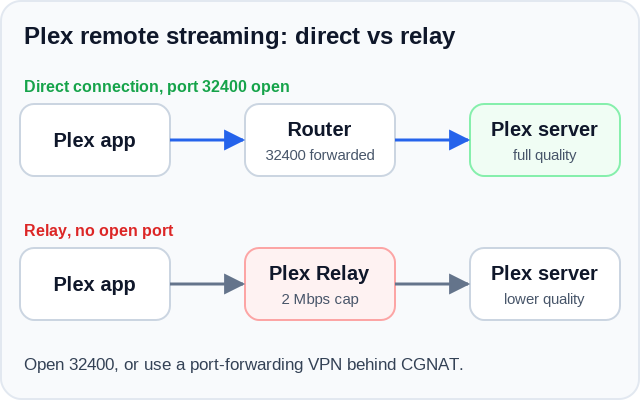
Plex uses TCP port 32400, the only port you forward for remote access. Discovery, DLNA and remote-control ports stay on your LAN. If Remote Access says "not available outside your network", check the manual port, double NAT and CGNAT. Behind CGNAT, a VPN with port forwarding gives you a direct connection instead of the 2 Mbps relay.
Some links on this page are affiliate links. If you buy through them, we may earn a commission at no extra cost to you.
- Main port
- 32400 TCP
- Ports to forward
- Only 32400 (or one public port mapped to it)
- Internal port
- Always 32400, not configurable
- Relay fallback
- Capped at 2 Mbps
- Full quality behind CGNAT
- With a VPN that opens 32400
Last updated:
All Plex Media Server ports
Plex lists the ports below for the firewall on the computer running Plex Media Server. Only 32400 is required. Plex strongly recommends not forwarding or exposing any of the others, especially on a machine with a public IP address.
| Port | Protocol | Used for | Forward on the router? |
|---|---|---|---|
| 32400 | TCP | Plex Media Server: apps, web app, API and remote streaming | Yes, the only one |
| 32410, 32412, 32413, 32414 | UDP | GDM network discovery of servers and players on the LAN | No |
| 1900 | UDP | DLNA discovery (SSDP) | No |
| 32469 | TCP | Plex DLNA Server | No |
| 5353 | UDP | Bonjour/Avahi discovery (older apps) | No |
| 3005 | TCP | Plex Companion remote control | No |
| 8324 | TCP | Controlling Plex for Roku via Plex Companion | No |
Which port does Plex need for remote access?
Only TCP 32400 on the server. Remote apps connect to one public port on your router, which forwards to 32400 on the server. The public port can be 32400 too, or any other number, as long as you tell Plex what it is.
You cannot change the port Plex Media Server listens on: the internal port is always 32400. What you can change is the external (public) port, under Settings > Remote Access > Manually specify public port. This matters later for VPNs, because the port that reaches your server still has to end up on 32400.
How to port forward Plex
- 1
Give the server a fixed LAN address
Reserve the server's IP in your router's DHCP settings, so the forwarding rule always points at the right machine.
- 2
Create the forwarding rule
On the router, forward TCP external port 32400 to internal port 32400 on the server's IP. If your router or ISP blocks 32400, use another external port such as 34567 and forward it to internal 32400.
- 3
Tell Plex the public port
In Plex Web, open Settings > Remote Access (under your server), click Show Advanced, tick Manually specify public port and enter the external port. Plex ignores the port unless the box is ticked.
- 4
Allow 32400 in the server's firewall
On Windows:
New-NetFirewallRule -DisplayName "Plex" -Direction Inbound -Protocol TCP -LocalPort 32400 -Action Allow. On Ubuntu:sudo ufw allow 32400/tcp. - 5
Retry and test
Click Retry on the Remote Access page; it should turn green with "Fully accessible outside your network". Confirm with the port forwarding test on your external port.
Docker
Publish 32400/tcp, or use host networking so discovery and DLNA also work on your LAN. Set ADVERTISE_IP to your public URL if clients keep picking a local address.
# docker-compose.yml
services:
  plex:
    image: plexinc/pms-docker
    network_mode: host        # or publish ports instead:
    # ports:
    #   - 32400:32400/tcp
    environment:
      - TZ=Etc/UTC
      - PLEX_CLAIM=claim-xxxxxxxx
    volumes:
      - ./config:/config
      - /path/to/media:/data
Plex Remote Access not working?
Start with the CGNAT check. If your ISP uses CGNAT, no router setting will make Plex reachable, and you can skip to the CGNAT options further down.
| What you see | Likely cause | Fix |
|---|---|---|
| "Not available outside your network" | No forwarding rule, UPnP failed, or the firewall blocks 32400 | Forward the port manually, tick Manually specify public port, allow 32400 in the firewall |
| Works with UPnP, then breaks after a router reboot | UPnP mapping lost or changed | Disable UPnP for Plex and use a manual rule with a fixed port |
| Public IP in Plex differs from the router's WAN IP | Double NAT: ISP modem and your own router both do NAT | Put the ISP modem in bridge mode, or forward on both devices |
| Router WAN IP is 100.64.x.x to 100.127.x.x | CGNAT: your ISP shares one public IP among many customers | Port forwarding cannot work; see the CGNAT options below |
| Remote streams are blurry or capped at 720p | Plex is using the relay (2 Mbps limit) | Get a direct connection; check for "Indirect" in the dashboard |
The Plex relay: why remote quality drops
When Plex cannot reach your server directly, apps connect through Plex's relay service instead. The relay works behind CGNAT, but Plex limits relayed streams to 2 Mbps. Anything above that is transcoded down, so 1080p and 4K files play at low quality, and your server's CPU or GPU does the transcoding. Downloads do not work over the relay.
On the Plex dashboard, a relayed stream shows as Indirect. If most of your remote streams are indirect, fixing direct access is the single biggest quality upgrade you can make.
Remote streaming now needs a pass
Since 2025, playing your own media outside your home needs either a Plex Pass on the server owner's account or a Remote Watch Pass on the viewer's account. The pass unlocks remote playback; a direct connection on port 32400 is what unlocks full quality, because relayed streams stay at 2 Mbps with or without a pass.
Plex remote access behind CGNAT
CGNAT is common on Starlink, 5G home internet (T-Mobile, Verizon) and many fiber ISPs. Your options are:
| Option | Cost | Works on TVs and family devices | Notes |
|---|---|---|---|
| Ask the ISP for a public IPv4 address | Varies; may need a business plan | Yes | Not offered by Starlink residential and most 5G plans |
| Tailscale or WireGuard into your LAN | Free | Only devices that can run the VPN app | Most smart TVs, Rokus and consoles cannot |
| Reverse proxy or tunnel on a VPS | VPS rental | Yes | You maintain a server; Plex needs a custom server URL |
| VPN with port forwarding | Subscription, 31-day money-back guarantee | Yes | Public port on the VPN server; no ISP or router changes |
Why the VPN port must reach 32400
Most VPNs that support port forwarding (Proton VPN, PIA) assign a random port, and traffic arrives at your server on that random port number. Plex only listens on 32400, so you would also need a redirect rule from the random port to 32400, and you must update Plex's manual public port every time the VPN hands out a new one.
PureVPN's Port Forwarding add-on lets you choose the port, so you can open 32400 itself. Enter 32400 as the manual public port in Plex, and the setup stays the same after reconnects. A dedicated IP keeps the public address constant as well. See port forwarding behind CGNAT for the full comparison.
Direct Plex connections behind CGNAT
PureVPN + Port Forwarding
- Open port 32400 itself, so Plex needs no port redirects.
- Friends and family connect directly: no relay, no 2 Mbps cap.
- Dedicated IP option, so the public address never changes.
- 31-day money-back guarantee.
Setting up Plex with a VPN port
- 1
Open port 32400 at the VPN
In the PureVPN Member Area, enable port forwarding and add TCP 32400. Connect to a server that supports port forwarding.
- 2
Run the VPN on the Plex server or the router
Running it on the router keeps other devices off the VPN. If you run it on the server, exclude local streaming apps or use split tunnelling so home playback stays on the LAN.
- 3
Set the manual public port in Plex
Settings > Remote Access > Manually specify public port: 32400. The public IP Plex shows should now be the VPN server's address.
- 4
Verify
Test 32400 with the port checker from outside, then play something on mobile data and confirm the dashboard no longer shows Indirect.
Get the best remote quality
Choose a VPN server near your home, and set Plex's remote streaming quality to match your upload speed. Direct streams then play at the quality your connection can carry, instead of the relay's 2 Mbps.
Is it safe to open port 32400?
- Forwarding 32400 is the setup Plex itself uses for Remote Access; connections are encrypted when Secure connections is set to Preferred or Required.
- Do not forward the discovery, DLNA or Companion ports. They are for your LAN only.
- Keep Plex Media Server updated, and turn on two-factor authentication for your Plex account.
- Check what your public IP exposes with the port scanner.
Plex port FAQ
What port does Plex use?
TCP 32400. Apps, the web app and remote streaming all go through it. The other Plex ports are only for discovery, DLNA and remote control on your local network.
What ports should I forward for Plex?
Only one: an external TCP port on your router (32400 or any other number) forwarded to port 32400 on the server. Enter the external port under Manually specify public port in Plex.
Can I change the Plex port from 32400?
Not the internal one; Plex Media Server always listens on 32400. You can use a different external port on your router and map it to internal 32400.
Why does Plex say "not available outside your network"?
Plex could not reach your public IP on the public port. Check the forwarding rule, the manual public port setting and the server's firewall, then rule out double NAT and CGNAT.
Does Plex work behind CGNAT?
Yes. Without an open port, Plex falls back to the relay at 2 Mbps. A VPN with port forwarding that opens 32400 gives you a direct connection at full quality; a public IP from your ISP or a VPS tunnel also work.
Do I need to forward port 32400 if Plex shows Indirect?
Yes. Indirect means the stream is going through the relay. A working port forward on 32400 (or a public port mapped to it) gives you a direct connection at full quality.
Is Plex port 32400 TCP or UDP?
TCP. Forward TCP 32400 for remote access. Plex's UDP ports, 32410–32414 and 1900, are only for discovery on your local network.
How do I open Plex by IP address?
Open http://<server-ip>:32400/web in a browser on your network, for example http://192.168.1.20:32400/web.
Is Plex port forwarding safe?
Yes, it is the setup Plex itself uses for Remote Access. Forward only 32400, set Secure connections to Preferred or Required, keep Plex Media Server updated and turn on two-factor authentication.
Does Plex remote access work with a VPN?
Yes, when the VPN forwards a port. A VPN with port forwarding, such as PureVPN with 32400 opened, gives Plex a direct connection. A VPN without port forwarding blocks inbound connections, so streams fall back to the relay.
Can Plex be accessed remotely?
Yes. Turn on Remote Access in Plex and forward TCP 32400, or let Plex fall back to its relay. Since 2025, remote playback of your own media also needs a Plex Pass or a Remote Watch Pass.
Why can I no longer access Plex remotely?
Check two things. Since 2025, remote playback needs a Plex Pass on the server owner's account or a Remote Watch Pass for the viewer. If you have one, the port mapping may have changed: set a manual public port and check for CGNAT.
How much does Plex remote access cost?
Remote playback needs a Plex Pass for the server owner, $6.99 a month or $69.99 a year, or a cheaper Remote Watch Pass for each viewer. Check plex.tv for current prices.
Can I use NordVPN for Plex remote access?
Not for a direct connection: NordVPN's standard plans do not include port forwarding, so remote streams fall back to the 2 Mbps relay. A VPN with port forwarding such as PureVPN can open 32400 instead.
References
- Plex: What network ports do I need to allow through my firewall? — the full list of Plex Media Server ports.
- Plex: Troubleshooting Remote Access — manual public port, double NAT and the CGNAT range.
- Plex: Accessing a Server through Relay — the relay's 2 Mbps limit.
Related tools
Related port guides
- Jellyfin port 8096Every Jellyfin port, how to change it, and remote access behind CGNAT.
- Emby port 8096Every Emby port, public vs local ports, and remote access behind CGNAT.
- Port forwarding behind CGNATOpen a port for game servers, Plex or self-hosting when your ISP uses CGNAT.
- Sonarr, Radarr and Prowlarr portsDefault ports for the *arr stack and download clients, and which ones to open.
- Home Assistant port 8123Which port Home Assistant uses, how to change it, and remote access behind CGNAT.