Port 37777
Port 37777: What Dahua Uses It For and How to Open It
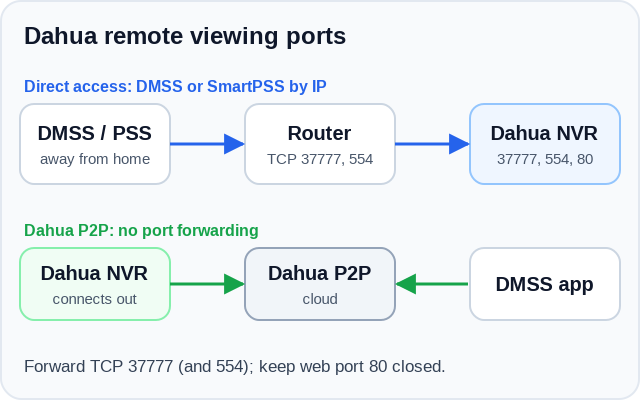
Port 37777 is the TCP port Dahua cameras, DVRs and NVRs use for the DMSS and SmartPSS apps. Dahua also uses UDP 37778, TCP 80 and 443 for the web interface and TCP 554 for RTSP. For remote viewing, forward TCP 37777 (and 554 if needed); behind CGNAT, a VPN with port forwarding opens it for you.
Some links on this page are affiliate links. If you buy through them, we may earn a commission at no extra cost to you.
- TCP port
- 37777 (DMSS, SmartPSS)
- UDP port
- 37778, optional
- Web interface
- 80 HTTP, 443 HTTPS
- RTSP
- 554
- Default camera IP
- 192.168.1.108
- Dahua P2P
- No port forwarding needed
Last updated:
What is port 37777 used for?
37777 is Dahua's TCP service port. The DMSS mobile app, the SmartPSS and DSS desktop software, the Dahua SDK and Dahua NVRs talking to Dahua cameras all connect on it. Recorders built by Dahua and sold under other names, such as Amcrest, use the same ports.
Because so many recorders expose it, 37777 is one of the most scanned camera ports on the internet. Open it only with current firmware and a strong password.
| Port | Protocol | Used for | Forward for remote access? |
|---|---|---|---|
| 37777 | TCP | DMSS, SmartPSS, DSS, the SDK and NVR-to-camera connections | Yes, for app access |
| 37778 | UDP | Optional UDP data transport | Rarely needed |
| 80 | TCP | Web interface (HTTP) and ONVIF | Avoid; use 443 if you need the web page |
| 443 | TCP | Web interface over HTTPS | Optional, instead of 80 |
| 554 | TCP | RTSP video for VLC, Blue Iris, Home Assistant and other software | Only if a third-party app needs the stream |
How to find or change Dahua ports
- Web interface: Setting > Network > Port lists the TCP, UDP, HTTP, RTSP and HTTPS ports.
- Recorder's local menu: open the network settings and look for the port page.
- ConfigTool, Dahua's free discovery tool, lists every device on your LAN with its IP and port.
- Dahua cameras ship with the IP 192.168.1.108 when DHCP is off.
Dahua P2P: no port forwarding needed
With P2P turned on, the recorder connects out to Dahua's cloud, and DMSS finds it by its serial number or QR code. Nothing needs forwarding, because every connection starts from the recorder.
P2P depends on Dahua's cloud being reachable and turned on. For a direct connection by IP from DMSS or SmartPSS, with no cloud in between, forward 37777, or use a VPN with port forwarding when your ISP uses CGNAT.
Dahua ONVIF port
ONVIF on Dahua cameras uses the HTTP port, 80 by default. Make sure ONVIF is enabled in the camera's network settings and sign in from the other NVR or software with a dedicated user account. If you changed the HTTP port, use the new port in the other system.
How to port forward a Dahua NVR or camera
- 1
Give the recorder a fixed IP
Set a static IP in the recorder's network settings, or reserve its address in your router's DHCP settings.
- 2
Pick the ports
Keep 37777, or move it to a less obvious number such as 37790 to cut down automated scans. Change it on the device first.
- 3
Forward TCP 37777
Create a TCP rule on your router to the recorder's IP for 37777, and add 554 only if a third-party app needs RTSP. Leave the web port 80 closed; add 443 if you need the web page remotely. If you set rules by hand, turn off UPnP on the recorder.
- 4
Test from outside
Check 37777 with the port forwarding test, then add the device in DMSS or SmartPSS with your public IP or DDNS name and port 37777.
Is port 37777 TCP or UDP?
TCP. Forward TCP 37777. The UDP port, 37778, is optional and most setups work without forwarding it.
Dahua RTSP URL
Use this format in VLC, Blue Iris or Home Assistant. Channel 1 is the first camera; subtype 0 is the main stream and 1 the sub-stream.
rtsp://username:password@192.168.1.108:554/cam/realmonitor?channel=1&subtype=0Dahua port forwarding not working?
| Symptom | Likely cause | Fix |
|---|---|---|
| 37777 shows closed from outside | The rule points at the wrong IP or protocol, or the recorder's IP changed | Forward TCP to the recorder's fixed IP |
| DMSS works at home, not away | The device was added by its LAN IP | Add it again with your public IP or DDNS name and port 37777 |
| P2P shows offline | P2P is off, or outbound traffic or DNS is blocked | Enable P2P and check the recorder's gateway and DNS settings |
| Router WAN IP is 100.64.x.x to 100.127.x.x | Your ISP uses CGNAT | Port forwarding cannot work; see the next section |
| Device offline after changing the port | Apps still use the old port | Update the port in DMSS, SmartPSS and the router rule |
Viewing Dahua cameras remotely behind CGNAT
Starlink, 5G home internet and many fiber ISPs use CGNAT, so no router rule can reach your recorder. P2P still works because it connects out, but direct access by IP needs a public port of your own.
| Option | Direct access by IP | Good to know |
|---|---|---|
| VPN with port forwarding | Yes | Opens 37777 on a public IP; 31-day money-back guarantee |
| Dahua P2P | No, through the cloud | Free; depends on Dahua's cloud |
| Tailscale or WireGuard into your LAN | Yes, from your own devices | Recorders cannot run the app, so it needs a router or PC as a gateway |
| Public IPv4 from the ISP | Yes | Often a business plan; not on Starlink residential or most 5G plans |
Set it up with PureVPN
PureVPN's Port Forwarding add-on lets you choose the ports, so you can open TCP 37777 exactly as your recorder expects. Recorders cannot run VPN apps, so set up PureVPN on your router, then add the device in DMSS or SmartPSS with the PureVPN IP and port 37777. A dedicated IP keeps that address the same, so saved devices keep working. See port forwarding behind CGNAT for the full setup.
Remote camera access behind CGNAT
PureVPN + Port Forwarding
- Open TCP 37777, or any ports your recorder uses, up to 15 at a time.
- Runs on routers, so NVRs and cameras need no app.
- Dedicated IP option for a fixed address in DMSS and SmartPSS.
- 31-day money-back guarantee.
Is it safe to open port 37777?
- Yes, with current firmware. Older Dahua firmware has authentication bypass flaws, CVE-2021-33044 and CVE-2021-33045, that attackers actively exploit, so update before you open anything.
- Forward only TCP 37777 and, if needed, RTSP 554. Keep the web port 80 closed to the internet.
- Use a strong, unique admin password, and create separate users with limited rights for viewing.
- Scan your public IP with the port scanner after any router change to confirm only the ports you chose are open.
Port 37777 FAQ
What is port 37777 used for?
It is Dahua's TCP service port. The DMSS app, SmartPSS, DSS, the Dahua SDK and NVR-to-camera connections use it, on Dahua and Dahua-made recorders such as Amcrest.
Is port 37777 TCP or UDP?
TCP. Dahua's UDP port is 37778, which is optional for remote viewing.
What are the default ports for Dahua cameras?
TCP 37777, UDP 37778, HTTP 80, HTTPS 443 and RTSP 554.
What is the default web port for Dahua cameras?
Port 80 for HTTP and 443 for HTTPS. Open http://<camera-ip> in a browser on your network.
What is a Dahua camera's default IP address?
192.168.1.108 when DHCP is off. With DHCP on, your router assigns the address; ConfigTool or the router's client list shows it.
What port does an NVR use?
It depends on the brand. Dahua and Amcrest use TCP 37777, Hikvision uses TCP 8000, and most recorders also use 80 for the web page and 554 for RTSP.
How do I set up port forwarding for my Dahua NVR?
Give the NVR a fixed IP, forward TCP 37777 (and 554 if you need RTSP) to it on your router, then add the NVR in DMSS or SmartPSS with your public IP or DDNS name and port 37777.
Do I need to forward port 37778?
Usually not. 37778 is Dahua's optional UDP port; DMSS and SmartPSS work with TCP 37777 alone.
What ports does Dahua P2P use?
None that you forward. With P2P on, the recorder connects out to Dahua's cloud and DMSS reaches it through that link, so you only need normal outbound internet access.
What port does Dahua use for ONVIF?
The HTTP port, 80 by default. Enable ONVIF on the camera and use a dedicated user account in the other system.
What is the Dahua RTSP URL?
rtsp://username:password@<ip>:554/cam/realmonitor?channel=1&subtype=0 for camera 1's main stream. Use subtype=1 for the sub-stream.
Why is Dahua port forwarding not working?
Check that the rule is TCP, points at the recorder's current IP and uses the same port as the device. If your router's WAN IP is in 100.64.0.0/10, your ISP uses CGNAT and router forwarding cannot work.
Is it safe to open port 37777?
Yes, with current firmware, a strong password and only the ports you need. Older firmware has actively exploited login bypass flaws, so update first.
References
- Dahua: How to set up remote access for an NVR — default ports TCP 37777, UDP 37778, HTTP 80, RTSP 554 and HTTPS 443.
- Amcrest: How to port forward your Amcrest NVR for remote access — the same ports on Dahua-made Amcrest recorders.
- NVD: CVE-2021-33044 — the Dahua authentication bypass listed in CISA's Known Exploited Vulnerabilities catalog.
- PureVPN: Port Forwarding add-on — choosing TCP and UDP ports to open on the VPN server.
Related tools
Related port guides
- Hikvision ports 8000 and 554Which Hikvision ports to forward, Hik-Connect and ONVIF ports, and remote viewing behind CGNAT.
- Port forwarding behind CGNATOpen a port for game servers, Plex or self-hosting when your ISP uses CGNAT.
- Home Assistant port 8123Which port Home Assistant uses, how to change it, and remote access behind CGNAT.
- VPN portsWhich port each VPN protocol uses, including PPTP and SSTP, and which ones to open.