NAT type
NAT Type Strict or Moderate? How to Get Open NAT
NAT type shows how easily other players can reach your console. Open on Xbox, or Type 1 or 2 on PlayStation, works with nearly everyone; Moderate limits who you can join; Strict or Type 3 blocks most matches, voice chat and hosting. Fix it with UPnP or port forwarding; behind CGNAT, a VPN with port forwarding on your router helps.
Some links on this page are affiliate links. If you buy through them, we may earn a commission at no extra cost to you.
- Best on Xbox
- Open
- Normal on PlayStation
- Type 2
- Best on Switch
- A
- Main Xbox port
- 3074 UDP and TCP
- Usual causes
- UPnP off, double NAT, CGNAT
- Fix behind CGNAT
- VPN with port forwarding
Last updated:
What NAT type means
Your router shares one public IP address between every device at home. That is network address translation (NAT). Online games, party chat and match hosting need other players to connect in to your console, and your NAT type rates how easily they can. The stricter it is, the fewer players you can reach.
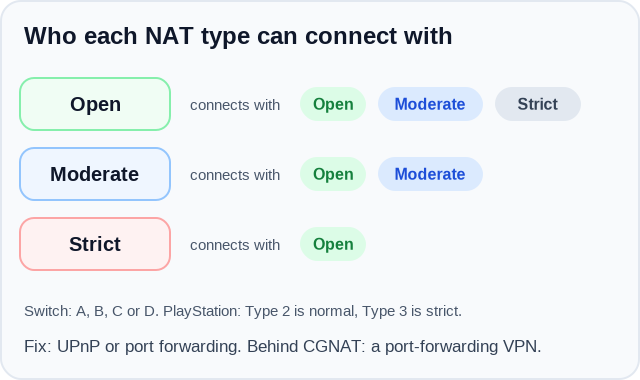
| Xbox | Nintendo Switch | What it means |
|---|---|---|
| Open | A | Connects with every player and can host matches and parties |
| Moderate | B | Connects with Open and Moderate players; hosting may not work |
| Strict | C or D | Connects only with Open players; voice chat and hosting often fail |
| — | F | The console could not finish the NAT test at all |
PlayStation NAT types 1, 2 and 3
PlayStation numbers its NAT types instead. Behind a router, Type 2 is the target; Type 1 is only possible without one.
- Type 1: the console connects straight to the modem with a public IP and no router.
- Type 2: the console connects through a router that handles games properly. This is the normal, good result at home.
- Type 3: the router or network blocks incoming connections, so matchmaking, voice chat and Remote Play can fail.
How to check your NAT type
- Xbox Series X|S and Xbox One: Settings > General > Network settings shows the NAT type; select Test NAT type to refresh it.
- PS5: Settings > Network > Connection Status > Test Internet Connection.
- Nintendo Switch: System Settings > Internet > Test Connection.
- Windows PC: in the Xbox app, open Settings > Network to see the NAT type and Teredo status.
What causes strict or moderate NAT
- UPnP is off on the router, so the console cannot open the ports it needs.
- Double NAT: an ISP modem-router and your own router both translate addresses.
- CGNAT: your ISP shares one public IP between many customers, so no setting on your router can open a port. Check with the CGNAT check.
- A strict router firewall or flood-protection feature that drops incoming game traffic.
- Several consoles competing for the same ports, such as two Xboxes wanting 3074.
How to fix strict or moderate NAT
- 1
Restart the console and router
A fresh start clears stale port mappings. Then test the NAT type again.
- 2
Turn on UPnP
Enable UPnP in the router's settings. Consoles use it to open their ports automatically, and it fixes most Moderate and Strict results.
- 3
Or forward the console's ports
If UPnP is missing or keeps failing, give the console a fixed IP and forward its ports on the router (see the table below).
- 4
Use one method at a time
Pick UPnP, port forwarding or DMZ, not several at once, because overlapping rules confuse the console's NAT test.
- 5
Remove double NAT
Put the ISP modem-router in bridge mode, or point its DMZ at your own router, so only one device does NAT.
- 6
Test from outside
Retest the NAT type on the console, and check a forwarded port with the port forwarding test.
"UPnP not successful" on Xbox
Xbox shows this when the router did not accept its UPnP request. Turn UPnP off and on again in the router, restart both devices, and retest. If it keeps failing, forward the Xbox ports manually, and check for double NAT or CGNAT.
Ports to forward for Xbox, PlayStation and Switch
Forward the ports to the console's fixed LAN IP. Port 3074 is Xbox's main game port, but Microsoft lists all of the Xbox ports below for Open NAT, and some games add their own.
| Console | TCP | UDP |
|---|---|---|
| Xbox Series X|S and Xbox One | 53, 80, 3074 | 53, 88, 500, 3074, 3544, 4500 |
| PlayStation 5 and PlayStation 4 | 80, 443, 3478–3480 | 3478–3479 |
| Nintendo Switch | Use UPnP | Use UPnP, or follow Nintendo's NAT guide |
Strict NAT behind CGNAT (Starlink, 5G home internet)
If your router's WAN IP is between 100.64.0.0 and 100.127.255.255, your ISP uses CGNAT. The ISP's gateway sits in front of your router, so UPnP and port forwarding cannot open anything, and consoles usually report Strict or Moderate. Starlink, T-Mobile and Verizon 5G Home Internet and many fiber ISPs work this way.
| Option | Works for consoles | Good to know |
|---|---|---|
| VPN with port forwarding on your router | Yes | Opens the console's ports on a public IP; 31-day money-back guarantee |
| Public IPv4 from the ISP | Yes | Often a business plan; not on Starlink residential or most 5G plans |
| A regular VPN without port forwarding | No | Usually makes the NAT type stricter |
Set it up with PureVPN
PureVPN's Port Forwarding add-on lets you choose the ports, so you can open exactly what your console uses, such as 3074, 88 and 500 for Xbox. Consoles cannot run VPN apps, so set up PureVPN on your router and connect it to the closest port-forwarding server for the lowest ping. Then retest the NAT type; if one game still reports Moderate, add that game's ports too. See port forwarding behind CGNAT for the full setup.
Open NAT behind CGNAT
PureVPN + Port Forwarding
- Open the ports your console needs, such as 3074, up to 15 at a time.
- Runs on routers, so Xbox, PlayStation and Switch are all covered.
- Dedicated IP option for a public address only you use.
- 31-day money-back guarantee.
Strict NAT on PC
- Turn on UPnP, or forward the game's ports to your PC's fixed LAN IP.
- Allow the game through Windows Defender Firewall when Windows asks.
- In the Xbox app, a Teredo status of "unable to qualify" points to blocked UDP 3544 or a missing UPnP mapping.
- A VPN app without port forwarding gives you Strict NAT; use one with port forwarding, or turn the VPN off for gaming.
Is open NAT safe?
- Yes for consoles. UPnP and console port forwarding only open the game ports the console listens on.
- Prefer port forwarding over DMZ on a PC, because DMZ sends every incoming port to that device.
- Keep the router's firmware updated, and turn UPnP off if you stop using it for games.
NAT type FAQ
How do I fix strict NAT type?
Turn on UPnP in your router, or give the console a fixed IP and forward its ports. Remove double NAT with bridge mode. Behind CGNAT, use a VPN with port forwarding on your router or ask the ISP for a public IP.
Is it bad if my NAT type is strict?
Yes for online play. Strict NAT can only connect to players with Open NAT, so matchmaking takes longer, voice chat drops and you cannot host matches.
Which NAT type is best for gaming?
Open on Xbox, Type 2 on PlayStation behind a router, and A on Nintendo Switch. They let you join and host with almost anyone.
How do I fix moderate NAT type?
Same as strict: enable UPnP, or forward the console's ports to its fixed IP, and use only one of UPnP, port forwarding or DMZ. Moderate on several consoles at once often means they compete for the same ports.
Is a moderate NAT type good?
It works for most games, but you can only connect with Open and Moderate players, and hosting may fail. Open NAT avoids those limits.
What causes moderate NAT?
Usually UPnP being off or failing, double NAT from two routers, a strict router firewall, or CGNAT at your ISP.
How do I change my NAT to open on Xbox?
Enable UPnP on the router, or forward UDP 88, 500, 3544 and 4500, plus TCP and UDP 53 and 3074 and TCP 80, to the Xbox's fixed IP. Then select Test NAT type in Network settings.
What does open NAT mean on Xbox?
Your Xbox can connect with players of every NAT type and can host matches and parties.
Is port 3074 good for Xbox?
3074 is Xbox's main game port, so forward it over both TCP and UDP. For Open NAT, Microsoft also lists 53, 80, 88, 500, 3544 and 4500.
How do I bypass strict NAT on Xbox?
Use UPnP, port forwarding or the router's DMZ. If your ISP uses CGNAT, none of these work on your router; a VPN with port forwarding running on the router can open the ports instead.
What NAT type is best for PS5?
Type 2 behind a router. Type 1 only appears when the PS5 connects directly to the modem with a public IP.
How do I fix the NAT type on PS5?
Enable UPnP, or give the PS5 a fixed IP and forward TCP 80, 443 and 3478–3480 and UDP 3478–3479. Then run Settings > Network > Connection Status > Test Internet Connection.
Why do I have NAT type 2 on PS5?
Because the PS5 is behind a router, which is normal. Type 2 works for online play and voice chat; you do not need Type 1.
Does the PS5 use UPnP?
Yes. With UPnP on in the router, the PS5 opens the ports it needs automatically, which usually gives Type 2.
What does NAT type failed mean on PS5?
The PS5 could not complete the NAT test, usually because UDP traffic is blocked or the connection dropped. Restart the router, enable UPnP and run the test again.
Can a VPN fix strict NAT?
Only a VPN with port forwarding, running on your router so the console's traffic goes through it. A regular VPN without port forwarding usually makes the NAT type stricter.
References
- Xbox Support: Open ports for Xbox network — the TCP and UDP ports Xbox needs, and UPnP as an alternative.
- Nintendo Support: NAT related troubleshooting — NAT types A to F on Nintendo Switch and how to improve them.
- RFC 4787: NAT Behavioral Requirements for Unicast UDP — how NAT mapping and filtering behaviour affects peer-to-peer traffic.
- PureVPN: Port Forwarding add-on — choosing TCP and UDP ports to open on the VPN server.
Related tools
Related port guides
- Port forwarding behind CGNATOpen a port for game servers, Plex or self-hosting when your ISP uses CGNAT.
- Minecraft ServerHost multiplayer Minecraft worlds.
- VPN portsWhich port each VPN protocol uses, including PPTP and SSTP, and which ones to open.
- WireGuard port 51820The WireGuard port, how to change and forward it, and fixes for failed handshakes.