WireGuard port
WireGuard Port 51820: How It Works and How to Open It
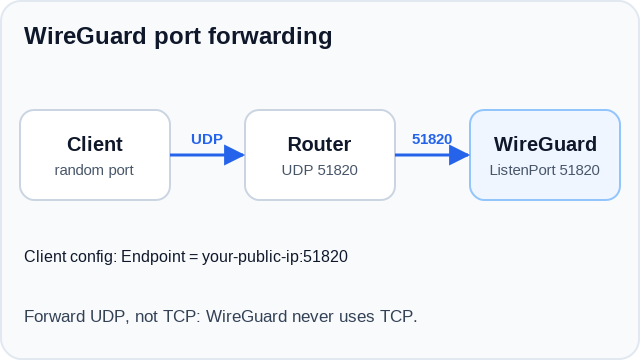
WireGuard uses UDP port 51820 by convention. The server's ListenPort sets the real port, any free UDP port works, and clients use a random port. To reach a home server, forward UDP 51820 to it and point each client's Endpoint at your public IP. Behind CGNAT, a VPN with port forwarding opens the port for you.
Some links on this page are affiliate links. If you buy through them, we may earn a commission at no extra cost to you.
- Default port
- UDP 51820 (convention)
- Protocol
- UDP only
- Set by
- ListenPort on the server
- Client port
- Random unless ListenPort is set
- Ports to forward
- One UDP port per server
- MikroTik default
- UDP 13231
Last updated:
What port does WireGuard use?
WireGuard listens on a single UDP port, and 51820 is the number almost everyone uses: it appears in WireGuard's own examples and is the default in PiVPN, wg-easy, the LinuxServer.io container and most router firmware. It is a convention rather than a protocol requirement. The ListenPort line in the server's configuration decides the real port, and any free UDP port works.
If ListenPort is missing, WireGuard picks a random port every time the interface comes up. That is exactly right for clients, which only connect out. A server needs a fixed port, because clients and your port forwarding rule point at it.
| Software | WireGuard port | Other ports |
|---|---|---|
| WireGuard (wg-quick) | Set by ListenPort; 51820 in the examples | — |
| PiVPN | UDP 51820 | — |
| wg-easy | UDP 51820 | TCP 51821 for the web UI |
| LinuxServer.io wireguard container | UDP 51820 (SERVERPORT) | — |
| ASUS and GL.iNet routers | UDP 51820 | — |
| MikroTik RouterOS | UDP 13231 | — |
| Tailscale (built on WireGuard) | UDP 41641 | Relays over TCP 443 when a direct path fails |
| NordVPN NordLynx | UDP 51820 | — |
Is WireGuard TCP or UDP?
UDP only. WireGuard has no TCP mode, so a TCP port forwarding rule or a TCP port check does nothing for it. Self-hosters on TCP-only networks wrap it in TCP with tools such as wstunnel or udp2raw. In a VPN app, Proton VPN's Stealth protocol runs WireGuard inside TLS over TCP for you.
How to set or change the WireGuard port
The server's ListenPort and the port in every client's Endpoint must match, and so must your firewall and port forwarding rules.
- 1
Set ListenPort on the server
In the
[Interface]section of/etc/wireguard/wg0.conf, setListenPort = 51820or your new port, then restart the tunnel withsudo systemctl restart wg-quick@wg0. - 2
Update each client's Endpoint
Set
Endpoint = vpn.example.com:51820with your public IP or dynamic DNS name and the new port. - 3
Update the firewall and router
Allow the new UDP port in the server's firewall and change the port forwarding rule to match.
Example configuration
# /etc/wireguard/wg0.conf on the server
[Interface]
Address = 10.8.0.1/24
ListenPort = 51820
PrivateKey = <server-private-key>

[Peer]
PublicKey = <client-public-key>
AllowedIPs = 10.8.0.2/32

# Client config: no ListenPort, so the client uses a random port
[Interface]
Address = 10.8.0.2/32
PrivateKey = <client-private-key>

[Peer]
PublicKey = <server-public-key>
Endpoint = vpn.example.com:51820
AllowedIPs = 0.0.0.0/0
PersistentKeepalive = 25
wg-easy and Docker
wg-easy publishes two ports: UDP 51820 for WireGuard and TCP 51821 for its web UI. Forward only the UDP port, and reach the web UI from your LAN or through a reverse proxy with HTTPS. If you change the WireGuard port in wg-easy, publish the same host port so the port written into client configs matches.
services:
  wg-easy:
    image: ghcr.io/wg-easy/wg-easy
    ports:
      - "51820:51820/udp"   # WireGuard
      - "51821:51821/tcp"   # web UI, keep it on your LAN
Choosing another port
Any free UDP port works. On networks that block 51820, UDP 443 usually gets through, because HTTP/3 (QUIC) uses it. Avoid UDP 53: captive portals and DNS filters often intercept it.
How to port forward WireGuard
- 1
Reserve the server's LAN IP
Give the WireGuard host a fixed address in your router's DHCP settings, so the rule always reaches it. If the router itself runs the WireGuard server, it opens the port for you and you can skip to the last step.
- 2
Add a UDP forwarding rule
Forward external UDP 51820 to the server's LAN IP on UDP 51820. The external port can differ, for example 51900 to 51820, as long as clients use the external port in their Endpoint.
- 3
Allow the port in the server's firewall
On Linux:
sudo ufw allow 51820/udp. On Windows:New-NetFirewallRule -DisplayName "WireGuard" -Direction Inbound -Protocol UDP -LocalPort 51820 -Action Allow. - 4
Free the port on the router
If the router's own WireGuard server is turned on with the same port, turn it off or pick another port, or the router answers instead of your server.
- 5
Connect from outside
Connect a phone on mobile data, then run
sudo wg showon the server. A latest handshake from a few seconds ago means the port works.
Testing UDP 51820 from outside
WireGuard stays silent to packets from unknown keys, so the UDP port checker reports 51820 as open or filtered even when forwarding works. To watch the test arrive, run a capture on the server while the check runs:
sudo tcpdump -ni any udp port 51820WireGuard handshake did not complete? Check these
| Symptom | Likely cause | Fix |
|---|---|---|
| No handshake, and tcpdump on the server shows nothing | The rule is TCP instead of UDP, points at the wrong IP, or the ISP uses CGNAT | Forward UDP to the right IP, then run the CGNAT check |
| tcpdump shows packets, but still no handshake | Public keys or AllowedIPs do not match | Compare each side's public key with the other side's Peer section |
| Works on home Wi-Fi, not on mobile data | Endpoint uses a LAN address | Set Endpoint to your public IP or a dynamic DNS name |
| Works for a while, then stops | Your public IP changed, or an idle NAT mapping expired | Use dynamic DNS, and set PersistentKeepalive = 25 on clients behind NAT |
| Fails only on hotel, airport or office Wi-Fi | The network blocks UDP or VPN traffic | Move the server to UDP 443, or use a VPN app with obfuscation |
Hosting WireGuard behind CGNAT
Starlink, 5G home internet and many fiber ISPs put customers behind CGNAT, so no router rule can reach a home WireGuard server. A VPN with port forwarding solves it without touching the ISP: the WireGuard host keeps an outbound connection to the VPN provider, and the provider forwards a port on its public IP to your server.
| Option | Keeps your own WireGuard server | Good to know |
|---|---|---|
| VPN with port forwarding | Yes | Clients only change the Endpoint; 31-day money-back guarantee |
| Tailscale or ZeroTier | No, replaces it | Every device signs in to the mesh service |
| Your own VPS as a relay | Yes | You rent and maintain a server |
| Public IPv4 from the ISP | Yes | Often a business plan; not on Starlink residential or most 5G plans |
Set it up with PureVPN
PureVPN's Port Forwarding add-on lets you choose the ports, so you can open UDP 51820 exactly as your server expects. Enable the port in the PureVPN Member Area, connect the WireGuard host (or your router) to a PureVPN server that supports port forwarding, and set each client's Endpoint to the PureVPN IP and port 51820. A dedicated IP keeps that Endpoint the same every time.
Your WireGuard tunnel then runs inside the PureVPN connection, so set MTU = 1280 in each client's [Interface] section for the smoothest connection. See port forwarding behind CGNAT for how this compares with other VPNs.
Forwarding ports through your own VPS
If you already rent a VPS, you can make it the public end: connect your home server to it over WireGuard, then forward ports from the VPS through the tunnel. This example forwards TCP 25565 to a home peer at 10.8.0.2:
# On the VPS
sysctl -w net.ipv4.ip_forward=1
iptables -t nat -A PREROUTING -i eth0 -p tcp --dport 25565 -j DNAT --to-destination 10.8.0.2
iptables -t nat -A POSTROUTING -o wg0 -j MASQUERADE
iptables -A FORWARD -i eth0 -o wg0 -p tcp --dport 25565 -j ACCEPT
iptables -A FORWARD -i wg0 -o eth0 -m conntrack --ctstate ESTABLISHED,RELATED -j ACCEPT
Host WireGuard behind CGNAT
PureVPN + Port Forwarding
- Open UDP 51820, or any port your server uses, up to 15 at a time.
- Keep your own WireGuard server and keys; only the Endpoint changes.
- Dedicated IP option, so the Endpoint never changes.
- 31-day money-back guarantee.
WireGuard blocked on Wi-Fi? Connect anyway
Hotel, airport and public Wi-Fi often allow only web traffic, and some networks recognise WireGuard's handshake on any UDP port. Two fixes get you connected:
- Your own server: move it to UDP 443, or wrap it in TCP with wstunnel.
- A VPN app: switch to a protocol that looks like ordinary HTTPS, such as NordVPN's NordWhisper and obfuscated servers, or Proton VPN's Stealth, which carries WireGuard inside TLS over TCP.
Best for restrictive networks
NordVPN
- NordLynx, built on WireGuard, for everyday speed.
- NordWhisper and obfuscated servers when WireGuard is blocked.
- Apps for Windows, macOS, Linux, Android and iOS.
- 30-day money-back guarantee.
WireGuard over TLS
Proton VPN
- Stealth wraps WireGuard in TLS, so it connects on TCP-only networks.
- Available in the Windows, macOS, Android and iOS apps.
- Open-source apps, based in Switzerland.
- 30-day money-back guarantee.
Is it safe to open port 51820?
- Yes. WireGuard does not answer packets from unknown keys, so a port scan cannot even tell the port is in use.
- Forward only the WireGuard UDP port. Keep admin interfaces such as wg-easy's TCP 51821 on your LAN or behind HTTPS with a password.
- Give every device its own key pair, and remove peers you no longer use.
- Scan your public IP with the port scanner to confirm nothing else is exposed.
WireGuard port FAQ
What port does WireGuard use?
UDP 51820 by convention. The server's ListenPort sets the actual port, and any free UDP port works as long as clients use the same port in their Endpoint.
What is the default WireGuard port?
WireGuard itself has no fixed default: without ListenPort it picks a random port. 51820 is the port used in WireGuard's examples and by most tools. MikroTik RouterOS uses 13231 and Tailscale uses 41641.
Is WireGuard port 51820 TCP or UDP?
UDP only. To get WireGuard through networks that allow only TCP, use a TCP wrapper such as wstunnel, or a VPN app that carries WireGuard over TLS, such as Proton VPN's Stealth.
Does WireGuard need port forwarding?
Only on the server. Forward one UDP port, usually 51820, to the WireGuard server. Clients only connect out, so they need no forwarding and can leave ListenPort unset.
Can I change the WireGuard port from 51820?
Yes. Change ListenPort on the server, the port in each client's Endpoint, and your firewall and port forwarding rules. UDP 443 is a good choice on restrictive networks.
Why does WireGuard say the handshake did not complete?
The server never answered. Usually the UDP port is not forwarded, a firewall blocks it, the keys do not match, or your ISP uses CGNAT. Run tcpdump on the server to see whether packets arrive.
Can I host a WireGuard server behind CGNAT?
Yes, with a VPN that supports port forwarding, such as PureVPN, or with a VPS that forwards traffic to you. Router port forwarding alone cannot work behind CGNAT.
Can I run WireGuard on port 443?
Yes, UDP 443. Set ListenPort = 443 and use :443 in each Endpoint. It is still UDP, so networks that only allow TCP 443 block it; use a TLS-based protocol such as Proton VPN's Stealth there.
Can WireGuard listen on more than one port?
Each WireGuard interface listens on one port. To accept several ports, run more interfaces, or forward extra external ports to the same ListenPort on your router or firewall.
How do I check if my WireGuard port is open?
Connect a client from mobile data and look for a recent handshake in wg show. A UDP port checker shows open or filtered, because WireGuard never answers unknown packets.
Can WireGuard be blocked?
Yes. Networks can drop UDP, block 51820 or recognise WireGuard's handshake. Moving to UDP 443 helps against simple filters; obfuscated protocols such as NordVPN's NordWhisper get past the rest.
Can I port forward for qBittorrent over a WireGuard VPN?
Yes, with a VPN that supports port forwarding, such as PIA or Proton VPN over WireGuard, or PureVPN with a port you choose. The *arr ports guide covers the torrent setup.
What is port 51820 used for?
UDP 51820 is the conventional WireGuard port, used by WireGuard servers, PiVPN, wg-easy and NordVPN's NordLynx. It is not an IANA-registered port, so other software can use it too.
What WireGuard port should I use?
51820, unless something blocks it. Any free UDP port works, UDP 443 gets through most restrictive networks, and each WireGuard interface on the same host needs its own port.
What is the WireGuard web UI port?
WireGuard has no web interface of its own. wg-easy, the most popular one, serves its web UI on TCP 51821; keep it on your LAN or behind HTTPS with a password.
References
- WireGuard: Quick Start — interface setup, the 51820 port in the examples and the 25-second keepalive.
- wg(8) manual — ListenPort, and the random port chosen when it is not set.
- wg-easy — default UDP 51820 and web UI TCP 51821.
- PureVPN: Port Forwarding add-on — choosing TCP and UDP ports to open on the VPN server.
Related tools
Related port guides
- OpenVPN port 1194UDP 1194 or TCP 443, Access Server ports, port forwarding and TLS errors.
- IPsec ports 500 and 4500IKE, NAT-T and ESP ports for IKEv2 and L2TP/IPsec, and how to allow them.
- VPN portsWhich port each VPN protocol uses, including PPTP and SSTP, and which ones to open.
- Port forwarding behind CGNATOpen a port for game servers, Plex or self-hosting when your ISP uses CGNAT.