OpenVPN port
OpenVPN Port 1194: UDP, TCP 443 and How to Open It
OpenVPN uses UDP port 1194, the port IANA assigned to it, by default. It also runs over TCP, and TCP 443 is the usual choice where UDP is blocked. Access Server adds TCP 943 for its web interface. Behind CGNAT, a VPN with port forwarding opens the port; on restrictive Wi-Fi, NordVPN connects over TCP 443.
Some links on this page are affiliate links. If you buy through them, we may earn a commission at no extra cost to you.
- Default port
- UDP 1194
- Also common
- TCP 443 and TCP 1194
- IANA registration
- 1194, TCP and UDP
- Access Server
- UDP 1194, TCP 443, TCP 943
- Fastest
- UDP
- Best through firewalls
- TCP 443
Last updated:
What port does OpenVPN use?
OpenVPN's default is UDP 1194. IANA registered port 1194 for OpenVPN over both TCP and UDP, and an OpenVPN server uses it unless the port and proto lines in its configuration say otherwise. Many servers and VPN providers also accept OpenVPN on TCP 443, so it works on networks that only allow web traffic.
| Software or service | VPN port | Good to know |
|---|---|---|
| OpenVPN Community server | UDP 1194 | Set by port and proto in server.conf |
| OpenVPN Access Server | UDP 1194 and TCP 443 | Web interface on TCP 943 and 443 |
| pfSense and OPNsense | UDP 1194 | Changed in the OpenVPN server settings |
| Synology VPN Server | UDP 1194 | Forward the port you set in VPN Server |
| PiVPN | UDP 1194 | Chosen during installation |
| NordVPN | UDP 1194 or TCP 443 | Pick UDP or TCP in the app |
| Private Internet Access | UDP 1197/1198, TCP 501/502 | Manual configs; the app offers more ports |
UDP 1194 or TCP 443?
Start with UDP. OpenVPN was designed for it, and it gives the best speed, because a lost packet is simply resent by the connection inside the tunnel. Over TCP, both the tunnel and the traffic inside it retransmit, which slows things down on poor links.
Use TCP 443 when UDP does not get through. Hotel, office and public Wi-Fi almost always allow HTTPS's port. A server can offer both: run one OpenVPN instance on UDP 1194 and another on TCP 443, and list both in the client profile. The client tries them in order.
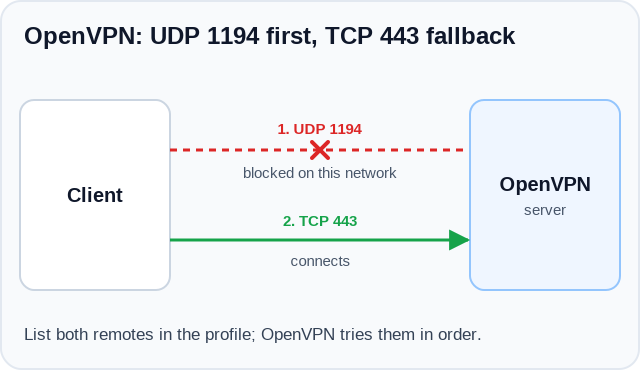
Client profile with a TCP 443 fallback
# client.ovpn: try UDP first, then TCP 443
remote vpn.example.com 1194 udp
remote vpn.example.com 443 tcp
How to change the OpenVPN port
- 1
Edit the server configuration
Set
portandprotoin server.conf, for exampleport 443andproto tcp, then restart OpenVPN, for examplesudo systemctl restart openvpn-server@server. - 2
Update every client profile
Change the
remoteline to the same port and protocol, such asremote vpn.example.com 443 tcp. - 3
Update the firewall and router
Allow the new port and protocol in the server's firewall and change the port forwarding rule to match.
Sharing TCP 443 with a website
If a web server already uses TCP 443 on the same machine, OpenVPN's port-share option lets both use it: OpenVPN keeps VPN connections and passes HTTPS requests to the web server on another port.
# server.conf
port 443
proto tcp
port-share 127.0.0.1 8443   # web server moved to 8443
OpenVPN Access Server
Set the VPN protocol and port numbers in the Admin Web UI's network settings. By default Access Server answers VPN clients on UDP 1194 and TCP 443, and serves its web interface on TCP 943 and 443.
SELinux
On RHEL, Fedora and Rocky Linux, label a non-default port before OpenVPN can listen on it: sudo semanage port -a -t openvpn_port_t -p udp 1195.
How to port forward an OpenVPN server
- 1
Reserve the server's LAN IP
Give the OpenVPN host a fixed address in your router's DHCP settings. If the router or firewall runs the OpenVPN server itself (ASUS, pfSense, OPNsense, Synology routers), it opens the port for you and you can skip to the last step.
- 2
Forward the port with the right protocol
Forward external UDP 1194 to the server's LAN IP on UDP 1194, or TCP if your server uses TCP. A UDP server ignores a TCP rule.
- 3
Allow it in the server's firewall
Ubuntu:
sudo ufw allow 1194/udp. RHEL and Fedora:sudo firewall-cmd --permanent --add-service=openvpnthensudo firewall-cmd --reload. Windows:New-NetFirewallRule -DisplayName "OpenVPN" -Direction Inbound -Protocol UDP -LocalPort 1194 -Action Allow. - 4
Point clients at your public address
Use your public IP or a dynamic DNS name in the
remoteline of every client profile. - 5
Connect from outside
Connect from a phone on mobile data. The server log shows
TLS: Initial packet fromwith the phone's IP when the port is reachable.
Testing the OpenVPN port
OpenVPN over TCP answers a normal connection, so the open port checker shows it as open. Over UDP, servers that use tls-auth or tls-crypt ignore packets without the key, so a UDP port check shows open or filtered; a real client connection is the reliable test.
"TLS key negotiation failed to occur within 60 seconds"
This OpenVPN error means the client's first packets never got an answer from the server. In almost every case the port is not reachable:
| Cause | How to spot it | Fix |
|---|---|---|
| Port not forwarded, or forwarded as TCP for a UDP server | No Initial packet lines in the server log | Forward the exact port and protocol to the server |
| Server firewall blocks the port | Packets reach the host but OpenVPN logs nothing | Allow the port in ufw, firewalld or Windows Firewall |
| Client and server use different protocols | Client uses proto tcp, server proto udp | Match proto and the remote line |
| tls-auth or tls-crypt key mismatch | Server log shows HMAC or tls-crypt errors | Copy the same key into the client profile |
| ISP uses CGNAT | Router's WAN IP is in 100.64.0.0/10 | Run the CGNAT check; see the next section |
| The client's network blocks UDP | Works on mobile data, fails on that Wi-Fi | Add a TCP 443 fallback |
Hosting OpenVPN behind CGNAT
Behind CGNAT, which is standard on Starlink, 5G home internet and many fiber ISPs, no router rule can reach a home OpenVPN server. A VPN with port forwarding solves it: the server keeps an outbound connection to the VPN provider, and the provider forwards a port on its public IP to your server.
| Option | Keeps your own OpenVPN server | Good to know |
|---|---|---|
| VPN with port forwarding | Yes | Clients only change the remote line; 31-day money-back guarantee |
| Tailscale or ZeroTier | No, replaces it | Every device signs in to the mesh service |
| Your own VPS as a relay | Yes | You rent and maintain a server |
| Public IPv4 from the ISP | Yes | Often a business plan; not on Starlink residential or most 5G plans |
Set it up with PureVPN
PureVPN's Port Forwarding add-on lets you choose the ports, so you can open UDP 1194, or TCP 443 for clients on restrictive networks. Enable the port in the PureVPN Member Area, connect the OpenVPN host to a PureVPN server that supports port forwarding, and put the PureVPN IP in each client's remote line. A dedicated IP keeps that address the same every time.
Your OpenVPN tunnel then runs inside the PureVPN connection, so add tun-mtu 1400 to both server and clients if large transfers stall. See port forwarding behind CGNAT for how this compares with other VPNs.
Host OpenVPN behind CGNAT
PureVPN + Port Forwarding
- Open UDP 1194, TCP 443 or any port your server uses, up to 15 at a time.
- Keep your own OpenVPN server and profiles; only the remote address changes.
- Dedicated IP option, so client profiles never need updating.
- 31-day money-back guarantee.
OpenVPN blocked on Wi-Fi? Connect over TCP 443
Restrictive networks drop UDP 1194, and some also use deep packet inspection to spot OpenVPN on any port. Two settings get you connected:
- Switch the app to OpenVPN over TCP 443, or another TCP port it offers. That gets past networks that filter by port.
- Turn on obfuscation, which disguises the VPN as ordinary HTTPS and also gets past deep packet inspection.
| VPN | OpenVPN ports | For restrictive networks |
|---|---|---|
| NordVPN | UDP 1194, TCP 443 | Obfuscated servers and the NordWhisper protocol |
| Private Internet Access | UDP 8080, 853, 123, 53; TCP 8443, 853, 443, 80 | Pick the remote port in the app |
| Proton VPN | UDP and TCP | Stealth protocol, which looks like HTTPS |
Best for restrictive networks
NordVPN
- OpenVPN over TCP 443 when UDP is blocked.
- Obfuscated servers and NordWhisper make the VPN look like regular web traffic.
- Apps for Windows, macOS, Linux, Android and iOS.
- 30-day money-back guarantee.
Choose your connection port
Private Internet Access
- Switch the remote port in the app, including TCP 443 and 80.
- WireGuard and OpenVPN in every app.
- Port forwarding on servers outside the US.
- 30-day money-back guarantee.
Is it safe to open the OpenVPN port?
- Yes, with certificates and
tls-crypt. With tls-crypt, the server ignores every packet without the shared key, so scanners see nothing and floods are dropped early. - Open only the VPN port. Keep Access Server's admin interface on TCP 943 reachable from addresses you trust.
- Keep OpenVPN updated, and revoke certificates for devices you no longer use.
- Scan your public IP with the port scanner to confirm nothing else is exposed.
OpenVPN port FAQ
What port does OpenVPN use?
UDP 1194 by default, the port IANA assigned to OpenVPN. Servers can use any port over UDP or TCP, and TCP 443 is the most common alternative.
Is OpenVPN port 1194 UDP or TCP?
Both. UDP is the default and the fastest. TCP, usually on port 443, gets through firewalls that block UDP.
Should I use port 1194 or 443 for OpenVPN?
Use UDP 1194 for speed, and offer TCP 443 as a fallback for clients on restrictive networks. Client profiles can list both, and OpenVPN tries them in order.
What ports does OpenVPN Access Server need?
UDP 1194 and TCP 443 for VPN clients, and TCP 943 for the web interface. TCP 945 is only used for clustering on versions before 3.0, and TCP 22 only if you manage the server over SSH.
Can OpenVPN and a web server share port 443?
Yes. In TCP mode, the port-share option hands HTTPS requests to the web server while OpenVPN keeps the VPN connections.
What does "TLS key negotiation failed to occur within 60 seconds" mean?
The client never heard back from the server. Usually the port is not forwarded, a firewall blocks it, the protocol does not match, or the tls-auth or tls-crypt key is wrong.
Do I need to open a port to use an OpenVPN client?
No. Clients only connect out. Only an OpenVPN server needs a forwarded port.
Why is OpenVPN not listening on port 1194?
Check that the service is running and read its log, then run sudo ss -tulpn | grep 1194. A typo in the port or proto line, another program on the port, or SELinux blocking a non-default port are the usual causes.
How do I check if the OpenVPN port is open?
For TCP, test the port with the open port checker. For UDP, connect a client from mobile data and look for TLS: Initial packet from in the server log.
Does OpenVPN use port 443?
It can. OpenVPN's default is UDP 1194, but many servers also listen on TCP 443, and OpenVPN Access Server uses TCP 443 by default alongside UDP 1194. TCP 443 gets through firewalls that block UDP.
What is port 1194 used for?
Port 1194 is the IANA-registered port for OpenVPN, over UDP by default and also over TCP. If it is open on a server, an OpenVPN server is usually listening there.
References
- IANA Service Name and Port Number Registry — port 1194 assigned to OpenVPN over TCP and UDP.
- OpenVPN Access Server: AWS FAQ — Access Server's inbound ports 1194, 443, 943 and 945.
- OpenVPN: TLS key negotiation failed — what the error means and how to fix it.
- Netgate: Sharing a port with OpenVPN and a web server — running OpenVPN and HTTPS on TCP 443.
- PureVPN: Port Forwarding add-on — choosing TCP and UDP ports to open on the VPN server.
Related tools
Related port guides
- WireGuard port 51820The WireGuard port, how to change and forward it, and fixes for failed handshakes.
- IPsec ports 500 and 4500IKE, NAT-T and ESP ports for IKEv2 and L2TP/IPsec, and how to allow them.
- VPN portsWhich port each VPN protocol uses, including PPTP and SSTP, and which ones to open.
- Port forwarding behind CGNATOpen a port for game servers, Plex or self-hosting when your ISP uses CGNAT.