IPsec ports
IPsec Ports: UDP 500, UDP 4500 and ESP Explained
IPsec uses UDP port 500 for IKE, the key exchange, and UDP port 4500 for NAT traversal. Encrypted data travels as ESP, IP protocol 50, not a port. IKEv2 and IKEv1 share these ports, and L2TP/IPsec adds UDP 1701 inside the tunnel. If a network blocks them, an obfuscated protocol such as NordVPN's gets through.
Some links on this page are affiliate links. If you buy through them, we may earn a commission at no extra cost to you.
- IKE
- UDP 500
- NAT traversal
- UDP 4500
- ESP
- IP protocol 50, not a port
- AH
- IP protocol 51, rarely used
- L2TP
- UDP 1701, inside IPsec
- IKEv2 vs IKEv1
- Same ports
Last updated:
IPsec ports and protocols
| Port or protocol | Used for | Needed for |
|---|---|---|
| UDP 500 | IKE: key exchange and tunnel setup | IKEv2, IKEv1 and L2TP/IPsec |
| UDP 4500 | NAT traversal: IKE and ESP wrapped in UDP | Any IPsec connection through NAT |
| ESP (IP protocol 50) | Encrypted data when there is no NAT | IPsec between public IP addresses |
| AH (IP protocol 51) | Authentication without encryption; breaks through NAT | Rare legacy setups |
| UDP 1701 | L2TP tunnel, carried inside IPsec | L2TP/IPsec only |
ESP and AH are protocols, not ports
Firewalls need a protocol rule for ESP and AH, not a port rule, and port checkers cannot test them. On Linux, allow them like this:
# iptables
iptables -A INPUT -p udp -m multiport --dports 500,4500 -j ACCEPT
iptables -A INPUT -p esp -j ACCEPT

# nftables
nft add rule inet filter input udp dport { 500, 4500 } accept
nft add rule inet filter input meta l4proto esp accept
How NAT traversal on UDP 4500 works
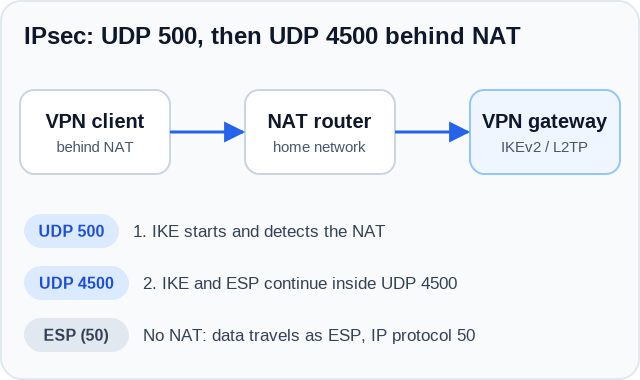
IKE starts on UDP 500. During the first exchange, both sides check whether a NAT device sits between them. If one does, which is the case for almost every home and mobile connection, they move to UDP 4500 and wrap ESP inside UDP 4500 packets, because home routers cannot track bare ESP traffic. Periodic keepalives then hold the NAT mapping open.
So for a VPN gateway behind a router, UDP 500 and 4500 are what matter. ESP rules matter for site-to-site tunnels between public IP addresses, where no NAT is involved.
IKEv2 ports
IKEv2 uses UDP 500 and 4500, exactly like IKEv1, so the same firewall rules cover both. It is built into Windows, macOS, iOS and Android, and its MOBIKE extension keeps the tunnel up when a phone switches between Wi-Fi and mobile data, which makes it a favourite for mobile VPN apps.
Some firewalls and clients can also carry IKE and ESP over TCP (RFC 8229) for networks that drop UDP. Support varies by vendor, so check your gateway's documentation before relying on it.
L2TP ports: 1701, 500 and 4500
L2TP/IPsec runs L2TP inside an IPsec tunnel. The IPsec layer uses UDP 500 and 4500, and L2TP's own UDP 1701 travels inside the encrypted tunnel. Synology and many routers still list 1701 among the ports to forward, so follow your device's guide; just never run L2TP without IPsec, because L2TP on its own is unencrypted.
Microsoft now points new Windows Server deployments to IKEv2 or SSTP: new Routing and Remote Access deployments on Windows Server 2025 no longer accept L2TP or PPTP by default. IKEv2 uses the same UDP 500 and 4500, so moving over keeps your firewall rules.
Fix L2TP error 809 when the server is behind NAT
Windows refuses L2TP/IPsec to a server behind NAT by default and reports error 809: "The network connection between your computer and the VPN server could not be established because the remote server is not responding." Set this registry value on the Windows client, then restart:
reg add HKLM\SYSTEM\CurrentControlSet\Services\PolicyAgent /v AssumeUDPEncapsulationContextOnSendRule /t REG_DWORD /d 2 /fHow to port forward an IPsec or L2TP server
- 1
Reserve the server's LAN IP
Give the VPN server or NAS a fixed address in your router's DHCP settings.
- 2
Forward UDP 500 and 4500
Forward both to the server's LAN IP. Add UDP 1701 only for L2TP/IPsec, and only if your device's guide asks for it. ESP cannot be port forwarded on most home routers, and with NAT traversal it does not need to be.
- 3
Turn off the router's own IPsec server
If the router runs its own IPsec or L2TP VPN server, it claims UDP 500 and 4500. Disable it, or the router answers instead of your server.
- 4
Connect from outside
Connect a phone on mobile data. For a deeper check,
ike-scansends real IKE packets and shows whether the gateway answers on UDP 500.
Why a UDP port check shows open or filtered
IKE gateways ignore packets that are not valid IKE messages, so a generic UDP port check on 500 or 4500 shows open or filtered even when forwarding works. A real client connection, or ike-scan, is the reliable test.
Site-to-site VPNs and cloud gateways
Site-to-site tunnels to cloud providers use the same IKE ports. AWS Site-to-Site VPN needs UDP 500 and ESP (IP protocol 50) between your gateway and both tunnel endpoints, plus UDP 4500 when NAT traversal is in use, and your gateway needs a static public IP. Azure VPN Gateway and Google Cloud VPN use the same IKE ports.
Allow these only from the peer's public IP addresses. Some firewalls, such as FortiGate, can move IKE to a custom port when an ISP blocks 500 and 4500.
Hosting a VPN server behind CGNAT
Behind CGNAT, which is standard on Starlink, 5G home internet and many fiber ISPs, an IPsec or L2TP server at home cannot receive connections, and IPsec through two layers of NAT is fragile even when it does. The smoothest path is WireGuard on a single UDP port, opened by a VPN with port forwarding. The WireGuard port guide walks through it.
IKEv2 blocked on Wi-Fi? Connect anyway
Hotel, airport and public Wi-Fi often drop UDP 500 and 4500, so IKEv2 VPN apps time out. Switch the app to a protocol that looks like ordinary HTTPS:
- NordVPN's NordWhisper protocol and obfuscated servers are built for networks that block VPNs.
- Proton VPN's Stealth protocol carries WireGuard inside TLS over TCP.
Best for restrictive networks
NordVPN
- NordWhisper and obfuscated servers make the VPN look like regular web traffic.
- OpenVPN over TCP 443 when UDP is blocked.
- Apps for Windows, macOS, Linux, Android and iOS.
- 30-day money-back guarantee.
Stealth protocol
Proton VPN
- Stealth wraps WireGuard in TLS, so it connects where UDP is blocked.
- Available in the Windows, macOS, Android and iOS apps.
- Open-source apps, based in Switzerland.
- 30-day money-back guarantee.
Which IPsec ports should be open?
- Open UDP 500 and 4500 only on VPN gateways, and for site-to-site tunnels only from the peer's IP addresses.
- Prefer IKEv2 with certificates or long random pre-shared keys. Avoid IKEv1 aggressive mode, which exposes a hash of the pre-shared key that can be cracked offline.
- Keep UDP 1701 closed unless your L2TP/IPsec server needs it, and never offer plain L2TP.
- Scan your public IP with the port scanner to confirm nothing else is exposed.
IPsec ports FAQ
What ports does IPsec use?
UDP 500 for IKE and UDP 4500 for NAT traversal, plus ESP (IP protocol 50) when there is no NAT. AH (IP protocol 51) is rarely used.
Is IPsec TCP or UDP?
IKE runs over UDP 500 and 4500, and ESP is its own IP protocol. Some gateways can also carry IPsec over TCP (RFC 8229), but UDP is the standard.
What is UDP port 4500 used for?
NAT traversal. When either side is behind NAT, IPsec moves IKE to UDP 4500 and wraps ESP in UDP 4500 packets so home routers can pass it.
What ports does IKEv2 use?
UDP 500 and UDP 4500, the same as IKEv1. ESP (IP protocol 50) is used only when no NAT sits between the two sides.
What ports does L2TP use?
UDP 500 and 4500 for the IPsec layer, and UDP 1701 for L2TP itself, which travels inside the IPsec tunnel. Many NAS and router guides list all three for port forwarding.
Is ESP port 50?
No. ESP is IP protocol number 50, not TCP or UDP port 50. Firewalls need a protocol rule for it.
How do I fix L2TP error 809?
Check that UDP 500 and 4500 reach the server. If the server is behind NAT, set AssumeUDPEncapsulationContextOnSendRule to 2 under HKLM\SYSTEM\CurrentControlSet\Services\PolicyAgent on the Windows client and restart.
Do I need to open ports to use an IKEv2 VPN app?
No. The app connects out, so nothing needs forwarding at home. Only a VPN server or gateway needs UDP 500 and 4500 open.
Do I need to forward ESP (protocol 50)?
Usually not. Behind a router, NAT traversal wraps ESP in UDP 4500, so forwarding UDP 500 and 4500 is enough. ESP rules matter between public IP addresses with no NAT.
How do I check if UDP 500 and 4500 are open?
Connect a client from outside your network, or run ike-scan against your public IP. A generic UDP port check shows open or filtered, because IKE gateways ignore invalid packets.
What is the difference between IPsec port 500 and 4500?
UDP 500 carries IKE, the key exchange that starts every IPsec tunnel. UDP 4500 carries NAT traversal: when NAT is detected, IKE and the encrypted ESP traffic move to 4500. Behind NAT you need both.
Does L2TP use TCP or UDP?
UDP. L2TP itself uses UDP 1701, carried inside IPsec, and the IPsec layer adds UDP 500 and 4500. L2TP does not use TCP.
What is port 1701 used for?
UDP 1701 is the L2TP port. In an L2TP/IPsec VPN it travels inside the IPsec tunnel, so the outside firewall mainly needs UDP 500 and 4500.
References
- RFC 7296: Internet Key Exchange Protocol Version 2 (IKEv2) — IKEv2 on UDP 500 and 4500.
- RFC 3948: UDP Encapsulation of IPsec ESP Packets — NAT traversal on UDP 4500.
- Microsoft: Which ports to unblock for VPN traffic to pass through — L2TP/IPsec, IKEv2, SSTP and PPTP ports and protocols.
- Microsoft: Configure an L2TP/IPsec server behind a NAT-T device — the AssumeUDPEncapsulationContextOnSendRule registry value.
- Microsoft: PPTP and L2TP deprecation — L2TP retirement in Windows Server and the move to IKEv2 and SSTP.
- AWS: Firewall rules for a Site-to-Site VPN customer gateway — UDP 500, ESP and UDP 4500 for AWS tunnels.
Related tools
Related port guides
- WireGuard port 51820The WireGuard port, how to change and forward it, and fixes for failed handshakes.
- OpenVPN port 1194UDP 1194 or TCP 443, Access Server ports, port forwarding and TLS errors.
- VPN portsWhich port each VPN protocol uses, including PPTP and SSTP, and which ones to open.
- Port forwarding behind CGNATOpen a port for game servers, Plex or self-hosting when your ISP uses CGNAT.